Integration
Put your alerts on your desk.
CrashGuard ships with a native Elgato Stream Deck XL+ integration, turning your 36-key panel into a real-time status board for every canary type you've configured, no need to keep a browser tab open.
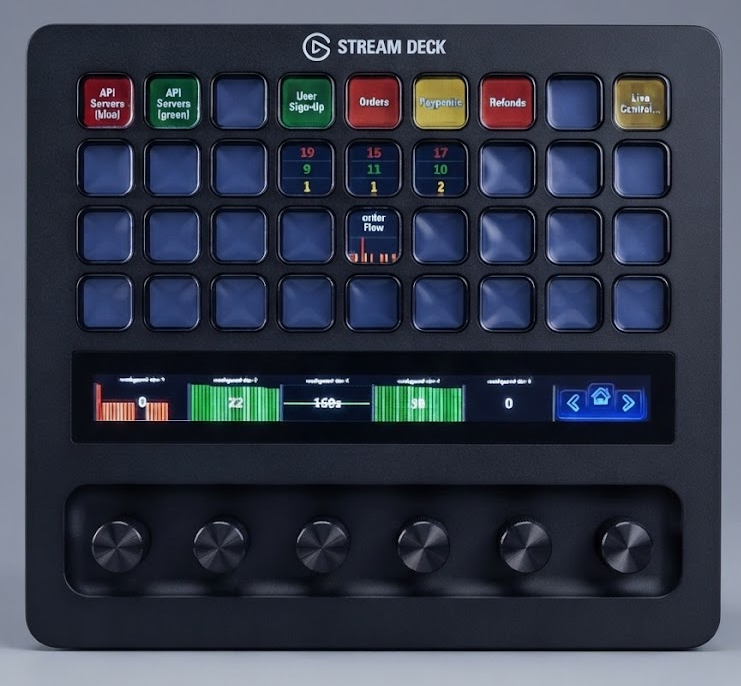
Simulated layout — each key shows its canary type, with live status and trend keys underneath.
Live status, one key per canary type
Assign any canary type to a key on your Stream Deck XL+. The key glows green while everything is healthy, amber when a canary is at risk, and red the instant one expires — visible at a glance without switching windows.
The 6 dynamic dials
Use the XL+'s touch strip and dials to drill into a canary type's stats, like currently pending, total resolved, triggered, at risk, and so on.
One-tap acknowledge and resolve
Tap a key on your stream deck to instantly access the admin portal and the information relevant to the configured alart / canary.
Per-profile layouts
Build a different key layout per on-call rotation or per environment — production canaries on one Stream Deck profile, staging on another, switchable with a single folder key.
Requires a Stream Deck XL+
The CrashGuard plugin is built specifically for the XL+'s 36-key layout and 6 touch dials. Install it from the Elgato Marketplace, point it at your self-hosted engine, and your keys will light up within seconds.
Sideloading from source
Not on the Marketplace yet, or want to run a development build? The plugin's source is public on GitHub. This plugin targets Stream Deck's SDK v2, which sideloads through Elgato's official CLI rather than an in-app setting — install it once, then enable Developer Mode from a terminal:
npm install -g @elgato/cli
streamdeck dev
Then clone and build the plugin:
git clone https://github.com/crashguard-io/crashguard-streamdeck.git
cd crashguard-streamdeck
npm install
npm run build
With Developer Mode on, link the built io.crashguard.streamdeck.sdPlugin
folder into Stream Deck:
streamdeck link io.crashguard.streamdeck.sdPlugin CrashGuard will appear in your actions list, ready to drag onto a key. If
you're actively developing the plugin, run npm run watch instead of
npm run build — it rebuilds and restarts the linked plugin automatically
on every change.
streamdeck link creates a symlink, which is convenient while developing
but means the plugin disappears if you delete or move the cloned repo. To deploy a standalone copy instead —
for example onto a machine that doesn't have the source checked out — copy the built
io.crashguard.streamdeck.sdPlugin folder directly into Stream Deck's
plugins directory instead of linking it. Developer Mode still needs to be on, and the Stream Deck app should
be closed while you copy:
- Windows —
%appdata%\Elgato\StreamDeck\Plugins\ - macOS —
~/Library/Application Support/com.elgato.StreamDeck/Plugins/
Relaunch the Stream Deck app afterward and the plugin will load from that copy. Note that since it's no
longer linked, picking up a newer build means repeating the copy — delete the old
io.crashguard.streamdeck.sdPlugin folder from the plugins directory and
copy the freshly built one back in.
Configuring the plugin
Once installed, open the Stream Deck app's Preferences → Plugins tab and select CrashGuard in the sidebar. Click the link under Helpful links — it opens the plugin's local configuration page in your browser.
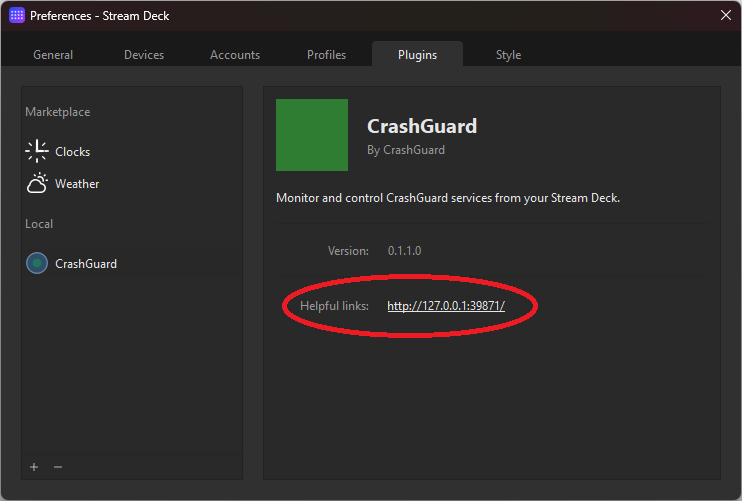
From there, set both URLs the plugin needs to talk to your self-hosted instance:
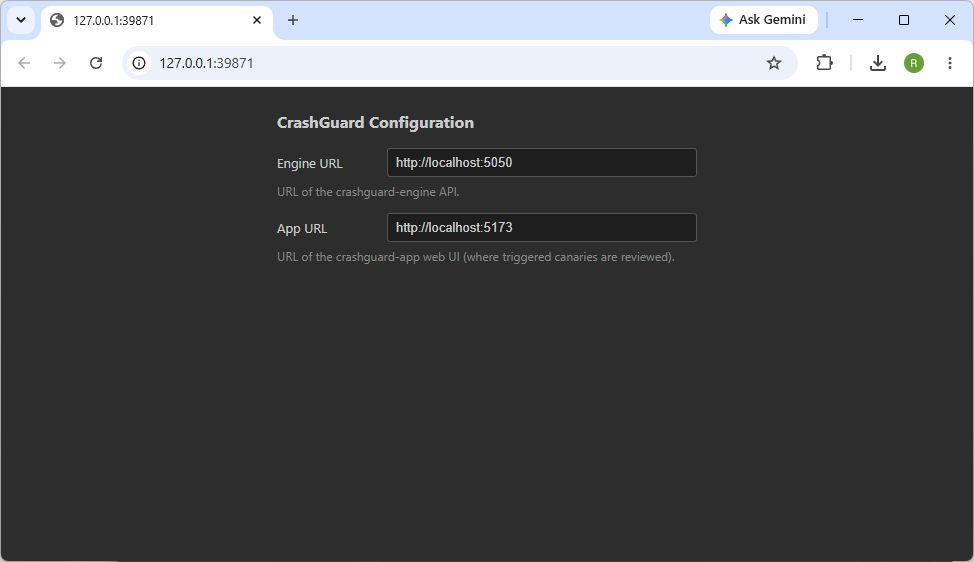
- Engine URL — where the
crashguard-engineAPI is reachable, e.g.http://localhost:5050. The plugin polls this directly to read canary status for your keys and dials. - App URL — where the
crashguard-appweb UI is reachable, e.g.http://localhost:5173. The plugin opens this URL when you tap a key to jump straight to the triggered canary.
Both default to localhost with the default ports, which only works if
the plugin runs on the same machine as your CrashGuard instance with ports left unmapped. If you're running
CrashGuard in Docker with remapped ports, or on a different machine entirely, update both fields to match
wherever you can actually reach the Engine and Admin App from this computer.